Reach customers at the right moment.
Keep one list of your customers and what they do, then reach them by email, SMS, push or in-app message, in one-off campaigns or journeys that follow what they do.
Request access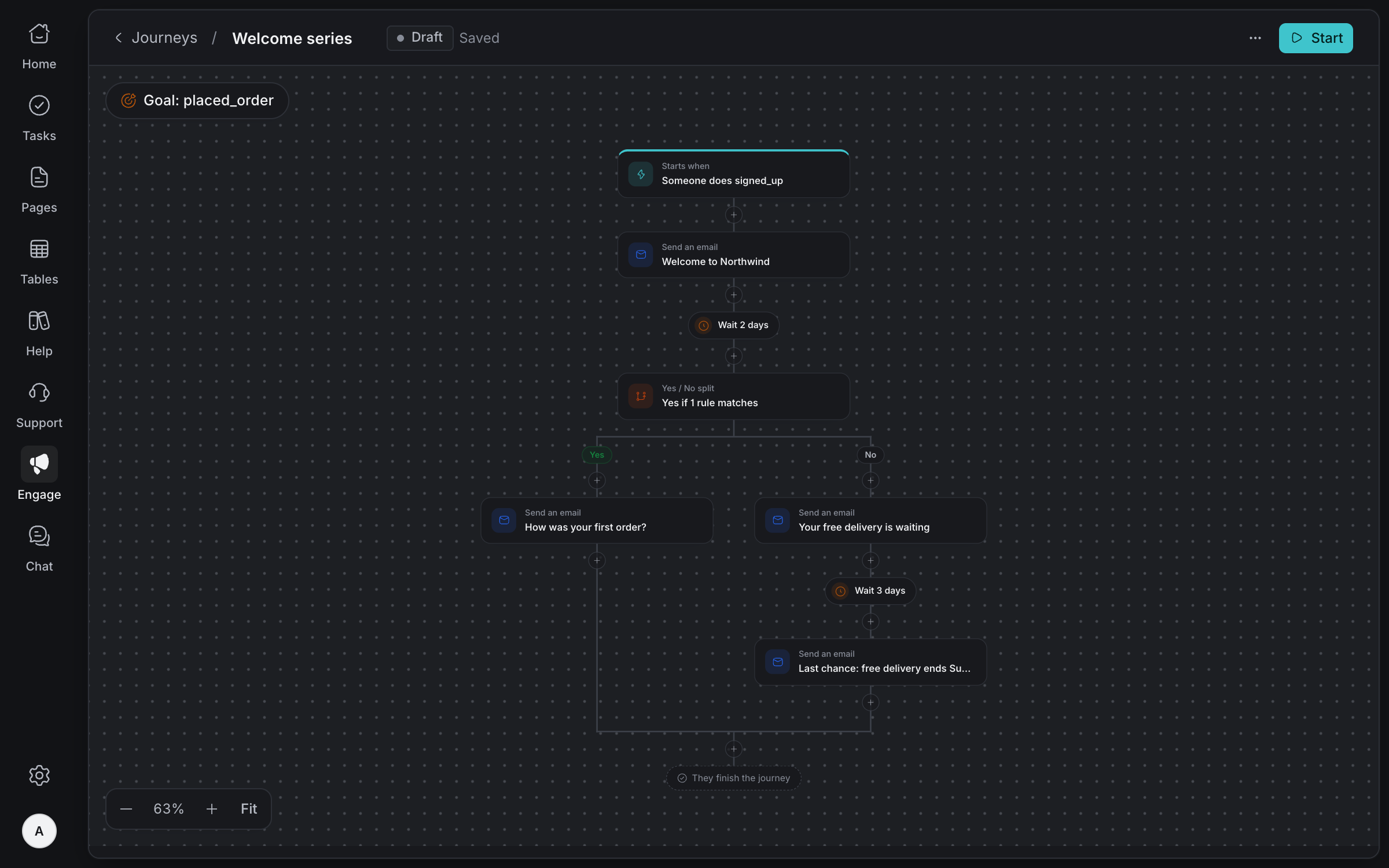
Know your
customers
Each person is stored once and linked to every product they use. Your apps send them in with what they do, or you import a spreadsheet, and their page shows everything they did and were sent.
One person, every product
Matched by your app's ID for them, then their email, then their phone.
Your apps send them in
Customers and events arrive through a key that can add and update, but never read anyone back.
Import a spreadsheet
Match each column to a detail or field, and say whether they agreed to email.
Your own fields
Add the details that matter to you, like plan or class.
Everything they were sent
Every email, SMS, push and in-app message, and what happened to each.
Events you can trust
See every event name your apps send, and the ones a journey waits for that never arrived.
Message a group,
on any channel
Pick an audience by rules, write once in blocks with each person's details filled in, send yourself a test, then send now or schedule it.
Email, SMS, push and in-app
Banners, pop-ups and full-screen messages inside your app. WhatsApp is coming.
Audiences that keep up
Rules on details, fields, what people did and what they agreed to, worked out as it sends.
Write in blocks
Text, pictures, buttons, callouts and receipt-style details, with names filled in.
Templates and saved blocks
Start from a template, and reuse the blocks your team saves.
Test first
Send yourself the email, SMS or push, or see the in-app message, before anyone else.
Owners and admins send
Your team drafts. Only owners and admins send, schedule or stop an email.
Journeys that follow
what they do
Start people on an event, an audience or rules. Send, wait for something they do, branch on what happened, and stop when they reach your goal.
Starts on what they do
An event your app sends, joining an audience, or matching rules.
Wait, check and split
Wait a while or until they do something, continue only if, or split into Yes and No.
Goals
Anyone who reaches the goal leaves at once, and counts as a success.
Owners and admins start
Others ask to start. An owner or admin starts the journey, or declines.
Pause safely
Everyone in a paused journey stays where they are until you resume it.
Agents build them too
AI agents draft, check, simulate and test journeys, then ask. An owner approves the start.
See what
it did
Every campaign has a report: who it reached, who opened and clicked, what they clicked and whether they then did what you hoped. Follow up with the people it missed.
Opens and clicks over time
Apple Mail's automatic opens aren't counted as people reading.
Clicks on the email
See how many people clicked each link, right on the email.
Goals
How many people did something after getting it, like paying fees.
Follow up
A copy of the campaign for one group, like everyone who didn't open it.
Compared with your last
Each result against your recent campaigns.
Every person
Who got it and who didn't, and why, ready to download as a spreadsheet.
And everything
else you need
Consent per channel
People get only what they agreed to, per product. Someone who unsubscribes can't be added back by your team.
Quiet hours for SMS
Promotional SMS goes out only between 8am and 8pm Nigerian time.
Shared with Support
Customers and support contacts are linked both ways, so each side knows the other.
Safe app keys
Each key belongs to one product, is shown once and kept only as a fingerprint.
Your email look
Your logo and brand colour, as a plain letter, a card, branded or a newsletter.
Signed email links
Opens, clicks and unsubscribes can't be faked or used to redirect people.
Reach the right customer at the right time
Tell us about your team and we'll help you set up your workspace.
Request access