Every piece of work, in one list.
Bugs, feature requests and project work for each of your products, tracked by your team and the AI agents working beside them.
Request access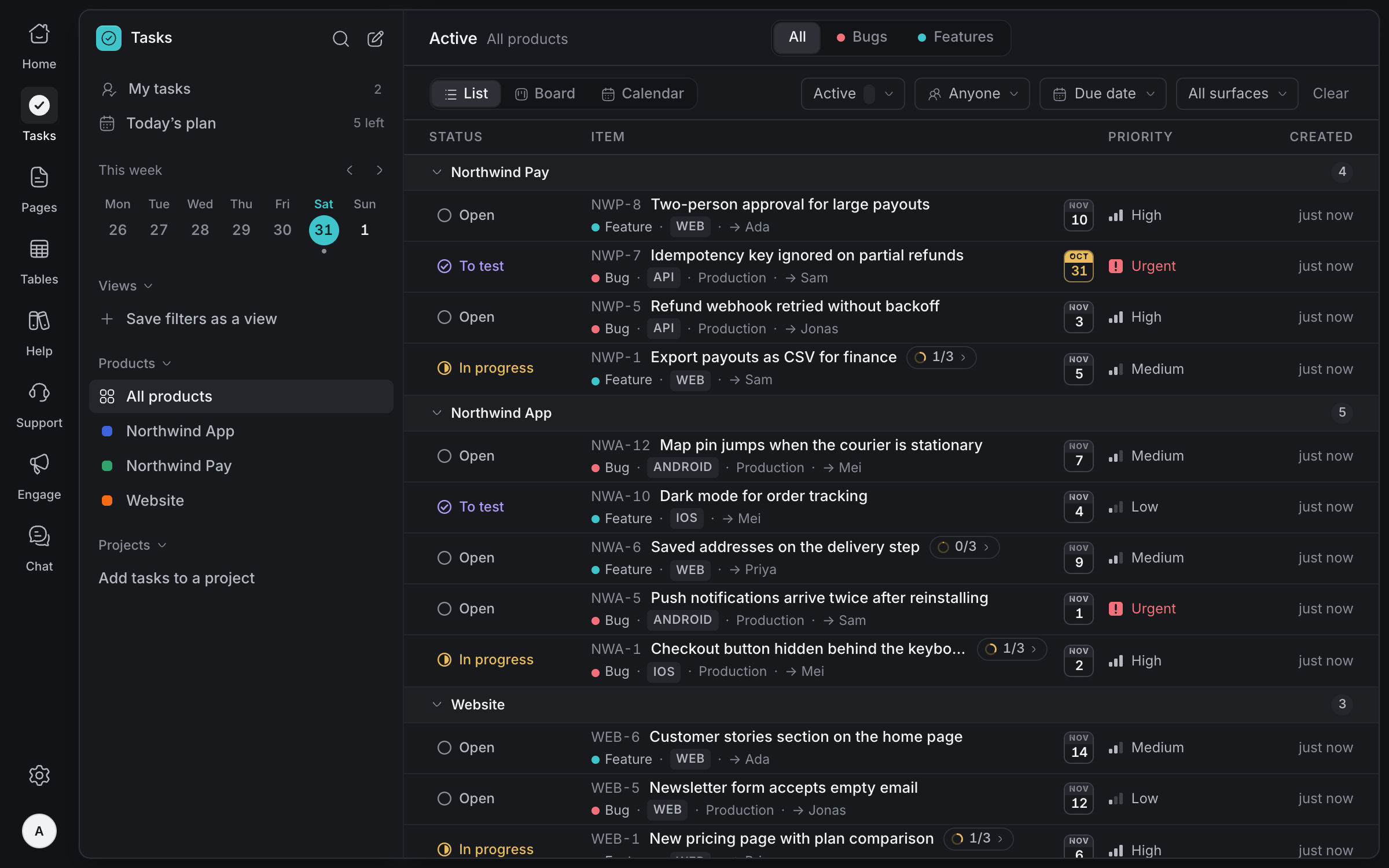
Capture
every request
Bugs and feature requests land in the right product with what it takes to act on them: where it happens, how urgent it is and who owns it. Similar tasks show up while you type, so duplicates don't.
Bugs and features
Every task is a bug or a feature request, filed under the product it belongs to.
Surface and environment
Say where it happens, web or app, and for bugs whether it's in production, staging or local.
Similar tasks
While a new task's title takes shape, up to three existing tasks that may cover it appear.
Priority
From low to urgent, so the most important work is easy to spot in any view.
See it
your way
The same tasks as a list, a board or a calendar. Filter by status, type, person, surface or due date, and save the filters you use as a view for yourself or the whole workspace.
List, board and calendar
Switch layouts without losing your filters. The board groups tasks by status.
Filters
Narrow by status, type, assignee, surface or due date, counted from your own day.
Saved views
Keep a set of filters as a view, just for you or shared with the workspace.
Products and projects
Each product gets its own short IDs, like NWA-12, and its own projects.
Break it down,
keep it on time
Split big work into sub-tasks and give anything a due date. Late work turns red, today's turns amber, and the calendar lets you drag a task to a new day.
Sub-tasks
Break a task into steps, one level deep, each with its own status and owner.
Due dates
A chip on every task: red once late, amber on the day, out of the way once done.
Drag to reschedule
Move a card to another day in the calendar to change its due date, and undo it if needed.
Overdue at a glance
Filter to overdue, today or this week to see what needs attention first.
Agents that
do the work
Connect your AI agents and they work tasks like teammates: claim one, open a pull request, move it to To test. A person checks it before it's done, and every step is in the task's history.
Claimed through MCP
Agents pick up work through Olamma's MCP endpoint or JSON API, with their own access.
To test before done
Agents hand work back as To test, so a person confirms the fix before it's marked done.
Pull requests
Link a task to its GitHub pull request and see where the change has got to.
Every change attributed
The history shows who did what, person or agent, and when.
Statuses that
mean something
Six statuses, each with one clear meaning, so everyone reads the list the same way: your team, your customers and your agents.
- Open
Reported and waiting for someone to pick it up.
- In progress
Someone, a person or an agent, is working on it now.
- To test
The change is made and waiting for someone to check it, so done really means done.
- Do later
Deliberately put off. Not finished, not rejected, and not picked up by agents.
- Done
Finished and checked.
- Won't do
Decided against, with the reason kept in its history.
And everything
else you need
Files and history
Attach screenshots and files, and see every change to a task: what changed, who changed it and when.
Project access
Choose who can see and change each project. Agents follow the same rules as people.
Search
Find any task by its ID, title, description, reporter or assignee, across every product.
Jira, Linear and GitHub
Connect them to see their issues beside your own tasks, or paste a link to bring one in.
My tasks and today's plan
Your own list across every product, and a plan for the day that follows the tasks in it.
Reports from anywhere
Agents and services file bugs through MCP or the JSON API, attributed to the person they act for.
Bring your team's work into one list
Tell us about your team and we'll help you set up your workspace.
Request access